When an automated line or robotic cell goes down, the cause is often a simple connectivity issue[cite: 11]. A failed M12 industrial Ethernet cable can halt production, and the pressure is on to find a correct replacement immediately[cite: 11]. But ordering a replacement isn't always as simple as searching for a generic "Gigabit Ethernet cable[cite: 11]." Using the wrong configuration can lead to communication errors, connection problems, or further downtime[cite: 11].
The fastest way to get your equipment running again is to systematically identify the failed cable's specifications and provide clear information to a supplier[cite: 11]. This guide walks you through troubleshooting the failure, identifying the connector you need, and sourcing a reliable replacement[cite: 11].
First, Confirm the Cable Is the Problem
Before you remove the cable, perform a quick check to ensure it's the true source of the failure[cite: 11]. Intermittent faults or connection issues can sometimes be mistaken for a complete cable failure[cite: 11].
- Check Physical Connections: Is the connector's coupling nut fully tightened on both ends[cite: 11]? Vibration can cause connectors to work loose over time, leading to a lost signal[cite: 11].
- Inspect Port LEDs: Check the indicator lights on the switch, I/O block, or device the cable is connected to[cite: 11]. A lack of activity or a persistent error light often points to a physical layer problem[cite: 11].
- Look for Obvious Damage: Scan the visible length of the cable for cuts, crushing, or extreme bends[cite: 11]. Inspect the connector heads for cracks, deformation, or signs of contamination from oil or chemicals[cite: 11].
Field Electrical Diagnostic Limits & Multimeter Troubleshooting Limits
Before removing a suspected cable, use a calibrated digital multimeter or insulation tester to quantify physical continuity and signal path integrity:
| Parameter / Diagnostic Test | Normal Healthy Cable Baseline | Defective / Failed Threshold | Primary Hardware Root Cause |
|---|---|---|---|
| Pin-to-Pin Contact Resistance ($R_c$) | Less than or equal to 3.0 m-ohms | Greater than 15.0 m-ohms (or OL) | Pin oxidation, fretting corrosion, or loose crimp socket |
| Core-to-Core Insulation ($R_{text{iso}}$) | Greater than 500 Mega-ohms (at 500V DC) | Less than 10 Mega-ohms | Moisture/fluid ingress into outer jacket or crushed core |
| Shield Continuity & Shell Resistance | Less than or equal to 0.5 ohms (Shell-to-Shell) | Greater than 10 ohms (or Broken) | Braid shield fatigue breakage or unbonded connector body |
| Differential Loop Resistance Skew | Less than 2% resistance difference between pairs | Greater than 5% difference | Partial strand snapping in dynamic drag chain flex |
If these checks don't resolve the issue, it's time to inspect the cable and its connectors more closely[cite: 11].
Common Failure Modes for M12 Ethernet Assemblies
Industrial environments are tough on cables[cite: 11]. Over time, physical stress, vibration, and environmental factors can lead to predictable failures[cite: 11]. Understanding these helps you know what to look for when inspecting a faulty assembly[cite: 11].
 [cite: 11]
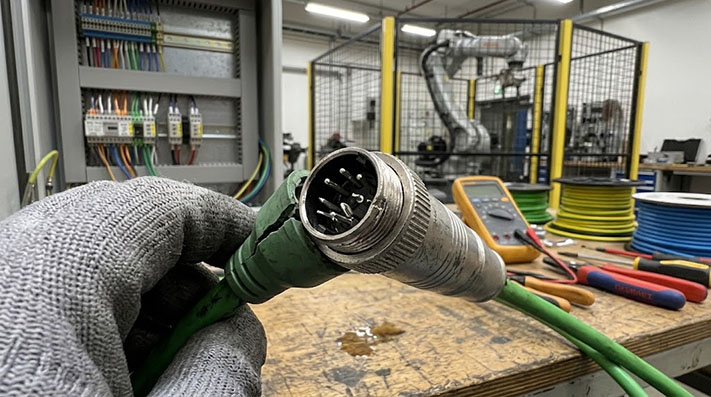
- Physical Damage to the Connector: This is the most common cause of failure[cite: 11]. Look for bent or broken pins inside the connector, a cracked plastic overmold, or a damaged metal coupling nut that no longer threads properly[cite: 11]. Dropping a heavy object on a connector or snagging it during maintenance can easily cause this kind of damage[cite: 11].
- Cable Jacket Abrasion or Cuts: If the cable runs along a floor, through a tight opening, or in a moving drag chain, its outer jacket can wear down[cite: 11]. Once the jacket is breached, the internal conductors and shielding are exposed to moisture, chemicals, or physical strain, leading to signal loss or short circuits[cite: 11].
- Electromagnetic Interference (EMI): A cable with failed or inadequate shielding can become susceptible to EMI from nearby motors, VFDs, or high-voltage lines[cite: 11]. This may not cause a total failure but can result in intermittent data errors that are difficult to diagnose[cite: 11]. This is often an issue if a standard office-grade Ethernet cable was mistakenly used in an industrial setting[cite: 11].
- Internal Conductor Breakage: Constant vibration or repeated flexing beyond the cable's bend radius can cause the fine copper conductors inside to break[cite: 11]. This failure is often invisible from the outside but results in a complete loss of connection[cite: 11].
Cable Failure Mechanisms & Physical Performance Qualification Matrix
Understanding the quantitative stress threshold of each failure mode prevents recurring line-down events when choosing replacement stock:
| Failure Mode & Mechanism | Environmental / Stress Driver | Quantified Failure Threshold / Metric | Standard Testing Protocol |
|---|---|---|---|
| Mechanical Braid Fatigue Snap | Dynamic Drag Chain / Torsion | Braid/Shield rupture after < 2,000,000 cycles | ISO 4649 / IEC 60332 |
| Jacket Chemical Swelling / Swell | Exposure to cutting oils / coolants | Weight / Volume change > 15% | ASTM D471 (Immersion at 70°C for 7 days) |
| High-Frequency EMI Packet Drop | Near VFD / High-Voltage Power Lines | Shield Transfer Impedance ($Z_t$) > 10 m-ohms/m | IEC 62153-4-3 (Transfer Impedance test) |
| Terminal Thread Stripping / Slip | Over-torquing during maintenance | Coupling nut thread strip torque < 1.5 Nm | IEC 61076-2-101 Mechanical Stress Test |
How to Identify Your Existing Cable Without Documentation
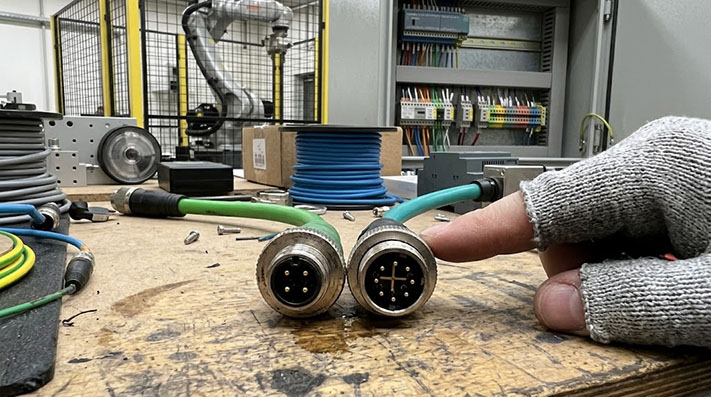
If you don't have the original equipment bill of materials or part numbers, you can identify the required replacement by examining the failed cable[cite: 11]. You will need to check four key features: coding, pin count, gender, and orientation[cite: 11].
 [cite: 11]
Connector Identification Checklist
| Feature | How to Check | Common Ethernet Configurations |
|---|---|---|
| 1. Coding | Look at the plastic insert inside the connector shell. A small notch or "key" prevents incorrect mating. Its position determines the code[cite: 11]. | D-Code: One flat notch. Used for 100 Mbps Industrial Ethernet (e.g., EtherNet/IP, Profinet)[cite: 11]. <br> X-Code: Cross-shaped "X" keyway. Used for high-speed Gigabit Ethernet up to 10 Gbps[cite: 11]. |
| 2. Pin Count | Count the number of metal pins (male) or sockets (female). This must match the coding[cite: 11]. | D-Code: 4 pins[cite: 11]. <br> X-Code: 8 pins[cite: 11]. |
| 3. Gender | Look at the electrical contacts. A male connector has visible pins. A female connector has sockets to receive the pins[cite: 11]. Most cable assemblies have one male and one female end[cite: 11]. | Check both ends of your cable[cite: 11]. Common setups are Male-Female, but Male-Male or Female-Female assemblies also exist[cite: 11]. |
| 4. Orientation | Look at the connector head's shape relative to the cable exit. A straight connector exits directly from the back[cite: 11]. A right-angle connector has the cable exiting at 90 degrees[cite: 11]. | Right-angle connectors are used to save space or reduce strain on the cable in tight installations[cite: 11]. Match the original orientation[cite: 11]. |
Beyond the connector itself, note the required cable length and the configuration of both ends[cite: 11]. Is it a connector on both sides, or does one end terminate in bare wires (a pigtail)[cite: 11]?
Sourcing Your Replacement: Off-the-Shelf vs. Custom Assembly
Mandatory Engineering Specification Checklist for Cable Replacement RFQs
To ensure your replacement cable withstands factory floor stress, verify these hard metrics before submitting your purchase order:
| Engineering Specification | Low-Speed Discrete I/O Replacement | High-Speed Gigabit / 10G Replacement | Critical Engineering Criteria |
|---|---|---|---|
| Connector Coding & Pin Out | M12 D-Code (4-Pin, Single Pair Shield) | M12 X-Code (8-Pin, Cross Shielded) | Must match mating receptacle port coding |
| Cable Jacket Compound | PVC (Fixed runs) or PUR (Oil flex) | PUR (High-flex) or TPE (High temp/chem) | Resists ambient industrial cutting fluids |
| Shielding Architecture | SF/UTP (Foil + Overall Braid) | S/FTP (Individual Pair Foil + Braid) | Prevents common-mode noise corruption |
| Dynamic Min. Bend Radius | 7.5 x Outer Diameter (OD) | 10 x Outer Diameter (OD) | Prevents conductor deformation in motion |
| Rated Operating Temperature | -20°C to +70°C | -40°C to +85°C (Extended Thermal) | Essential for high-density control cabinets |
Once you know the specifications, you have two main sourcing options[cite: 11].
- Off-the-Shelf Standard Cables: For common configurations like a 2-meter, straight M12 D-Code male-to-female cable, you may be able to find a pre-made assembly in stock from a distributor or manufacturer[cite: 11]. This is often the fastest option for standard applications[cite: 11]. The risk is that the length or quality may not be an exact match for the original OEM part[cite: 11].
- Custom-Built Cable Assemblies: If you need a specific length (e.g., 3.7 meters), a high-flex or oil-resistant PUR jacket, or a non-standard connector combination, a custom assembly is the better choice[cite: 11]. While this typically involves a short lead time for production, it guarantees a perfect fit for your application, reducing the risk of premature failure[cite: 11].
For a critical MRO replacement, the certainty of a correctly specified custom assembly can be more valuable than the potential speed of an off-the-shelf part that might not be quite right[cite: 11].
Get a Fast and Accurate Replacement Configuration
Downtime is costly, and identifying the right industrial cable under pressure can be challenging[cite: 11]. If you are unsure about any specification, the most reliable method is to work with a supplier who can identify the part for you[cite: 11].
At ConnecLink, we specialize in industrial connectors and cable assemblies for factory automation[cite: 11]. Send us a clear photo of the connector you need to replace, noting the coding, pin count, and any visible markings[cite: 11]. Include the required cable length and the application environment[cite: 11].
Our team will review your photos and requirements to identify a suitable replacement[cite: 11]. We can confirm a replacement model and provide a quote, helping you get the right part ordered and your equipment back online[cite: 11].
<!--[googlesitekit-end-of-content]-->