
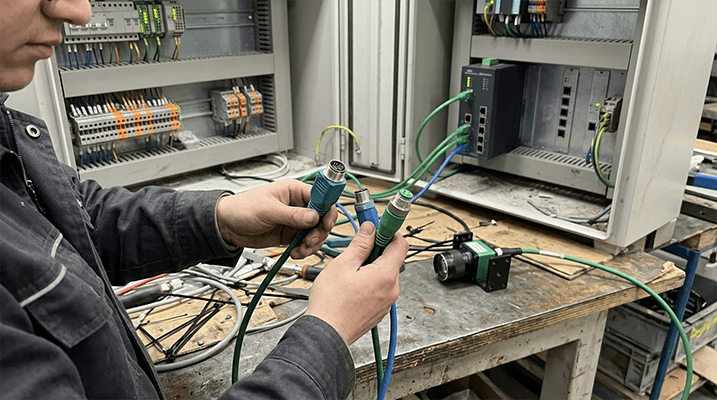
When selecting M12 connectors for an industrial Ethernet network, the choice between X-code and D-code is critical. While they look similar, they are designed for different data speeds and are not interchangeable. Choosing the wrong one can lead to project delays, incorrect parts, and equipment that simply won't connect.
This article clarifies the practical differences between M12 X-code and D-code connectors. We'll cover their performance, pinouts, and common applications so you can confidently select the right cable for your PLC, switch, or machine vision system.
TL;DR: The Quick Answer
- M12 D-Code: Use for 10/100 Mbps Ethernet. It has 4 pins and is the standard for most industrial automation systems using protocols like Profinet and EtherNet/IP[^3].
- M12 X-Code: Use for high-speed Gigabit Ethernet up to 10 Gbps. It has 8 pins and is required for applications like high-resolution machine vision and factory network backbones.
- Key Rule: They are physically incompatible. A D-code cable will not plug into an X-code port, and vice-versa. Always check the port on your device first.
The Core Difference: Data Speed and Pin Count
The "coding" or "keying" on an M12 connector refers to the physical shape of the insulator and pin layout. This design prevents you from connecting incompatible connectors, protecting your equipment from electrical damage and ensuring signal integrity.
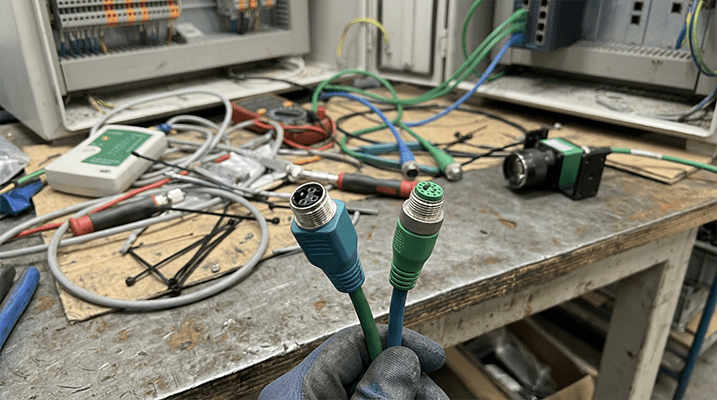
M12 D-Code: The 100 Mbps Workhorse
The M12 D-code connector uses a 4-pin configuration. It's designed to support Category 5e (Cat5e) standards for 10/100 Mbps Fast Ethernet[^1]. For years, this has been the go-to connector for industrial automation, providing reliable data transfer for the majority of PLCs, HMIs, sensors, and remote I/O modules.
M12 X-Code: The High-Speed Gigabit Option
The M12 X-code connector features an 8-pin layout with special shielding between the twisted pairs. This design minimizes crosstalk and allows it to support Category 6A (Cat6A) performance for high-speed data transmission up to 10 Gbps[^2]. This makes it the standard for any application demanding more bandwidth than 100 Mbps can provide.
Comparison Table: M12 D-Code vs. X-Code at a Glance
| Feature | M12 D-Code | M12 X-Code |
|---|---|---|
| Pin Count | 4-Pin | 8-Pin |
| Maximum Data Rate | 100 Mbps | 10 Gbps |
| Typical Ethernet | Fast Ethernet (10/100BASE-T), Cat5e | Gigabit Ethernet (10GBASE-T), Cat6A |
| Internal Arrangement | 4 pins arranged in a square pattern. | 8 pins with X-shaped shielding between pairs. |
| Common Protocols | Profinet, EtherNet/IP, EtherCAT[^4] | High-speed EtherNet/IP, TCP/IP, machine vision |
| Primary Use Cases | PLCs, sensors, actuators, HMIs, I/O blocks | High-resolution cameras, network backbones, IIoT |
When to Specify M12 D-Code (100 Mbps)
For a large portion of industrial equipment, 100 Mbps is more than sufficient. You should specify an M12 D-code 4-pin cable assembly for:
- Connecting to standard PLCs and controllers.
- Wiring distributed I/O blocks and valve terminals.
- Networking HMIs and operator panels.
- Most sensor and actuator applications running on an Ethernet protocol.
- Systems where the device port or manual explicitly calls for a D-coded M12 connector.
Using an over-specified X-code cable in a D-code system offers no performance benefit and results in unnecessary cost.
When to Upgrade to M12 X-Code (Up to 10 Gbps)
The demand for higher bandwidth is growing, especially in data-intensive applications. You will need an M12 X-code 8-pin high-speed cable assembly when:
- Connecting High-Resolution Machine Vision Cameras: These cameras generate large amounts of data that require gigabit speeds for real-time processing.
- Building a Factory Network Backbone: Connecting switches or linking different production cells often requires a high-speed backbone to prevent data bottlenecks.
- High-Speed Data Acquisition: Transferring large logs or diagnostic files from industrial PCs (IPCs) or servers.
- Future-Proofing New Equipment: If you are designing new machinery, choosing X-code provides a clear upgrade path as data requirements increase.
How to Avoid Costly Mistakes: Check Your Equipment First
The easiest way to guarantee you order the correct cable is to inspect the female connector port on your device (switch, camera, PLC, or I/O block).
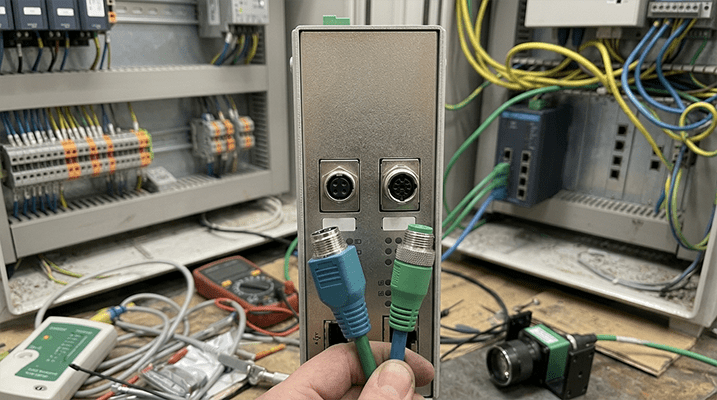
- A D-code port will have four socket contacts and a single, flat keying notch.
- An X-code port will have eight socket contacts and a distinct "X" shaped keyway.
If you cannot physically inspect the port, check the device's datasheet or user manual. The specifications will clearly state "M12 D-Coded" or "M12 X-Coded" for its Ethernet ports.
Getting the Right Cable Assembly Quoted
Once you've identified the correct coding, you need to specify the complete assembly. To get an accurate quote, be sure to include the following details in your RFQ:
- Connector Coding: M12 D-code or X-code.
- Connector A: Male or female, straight or right-angle.
- Connector B: The connector on the other end (e.g., another M12, an RJ45, or unterminated/stripped wires).
- Cable Length: In meters or feet.
- Jacket Material: PVC for general use or PUR for applications requiring high flexibility, drag-chain use, or oil resistance.
- Shielding: Shielded cable is standard for industrial Ethernet to protect against electromagnetic interference (EMI)[^5].
- Quantity: For prototype, repair, or production volumes.
Frequently Asked Questions (FAQ)
1. Can I plug an X-code cable into a D-code device? No. The physical keying is different, and the connectors will not mate. This is an intentional design to prevent incorrect connections.
2. Is X-code always better because it's faster? Not necessarily. The cable must match the device port. Using an X-code cable with a device designed for 100 Mbps D-code offers no advantage and is not possible due to the physical incompatibility. Always choose the code that matches your hardware.
3. What about M12 A-code, B-code, or S-code connectors? Those are for different applications. A-code is typically for sensors and actuators (DC power and signal), B-code is for Fieldbus (like Profibus), and S/T/K/L-codes are for AC/DC power. They are not used for Ethernet communication.
4. Do I need shielded cable for industrial Ethernet? In almost all cases, yes. Factory floors are noisy electrical environments. Shielded cable (often specified as SF/UTP - Shielded/Foiled with Unshielded Twisted Pairs[^6]) is essential for protecting data signals from EMI generated by motors, VFDs, and other equipment[^7].
Need Help Confirming the Right Cable?
Choosing the wrong connector can stop a project in its tracks. If you're not sure which coding matches your device, we can help.
Send us your switch model number, a photo of the device port, or the relevant datasheet. Our team can confirm the right cable for your application—free of charge.
Ready to order or need a quote? Send us your requirements, and we'll provide a clear, detailed quotation for your M12 industrial Ethernet cable assemblies.
[^1]: "ISO/IEC 11801-1:2022 — Information technology — Generic cabling for customer premises — Part 1: General requirements", https://www.iso.org/standard/81470.html. Evidence role: standard; source type: standards_body. Supports: ISO/IEC 11801 defines structured cabling standards including Category 5e (Cat5e) performance requirements for twisted-pair cabling supporting 10/100 Mbps Fast Ethernet. Accessed 2026-07-27. Scope note: ISO/IEC 11801 series covers generic cabling; specific Cat5e electrical parameters are defined in IEC 61156-5. [^2]: "IEEE Std 802.3an-2006 — Physical layer specifications and management parameters for 10 Gb/s operation over twisted pair cables (10GBASE-T)", https://standards.ieee.org/standard/802_3an-2006.html. Evidence role: standard; source type: standards_body. Supports: IEEE 802.3an defines 10GBASE-T physical layer specifications for Gigabit Ethernet over twisted-pair cabling requiring Category 6A or better performance. Accessed 2026-07-27. [^3]: "IEC 61158-1:2019 — Industrial communication networks — Fieldbus specifications — Part 1: Overview and guidance for the IEC 61158 and IEC 61784 series", https://webstore.iec.ch/publication/59781. Evidence role: standard; source type: standards_body. Supports: IEC 61158 is the international fieldbus standard series that includes Type 10 (PROFINET), Type 2 (CIP/EtherNet/IP), and Type 12 (EtherCAT) as standardized industrial Ethernet communication profiles. Accessed 2026-07-27. [^4]: "IEC 61158 series — Industrial communication networks — Fieldbus specifications", https://webstore.iec.ch/series/61158. Evidence role: definition; source type: standards_body. Supports: The IEC 61158 series standardizes multiple industrial Ethernet protocols including PROFINET (Type 10), CIP/EtherNet/IP (Type 2), and EtherCAT (Type 12). Accessed 2026-07-27. [^5]: "IEC 61000 series — Electromagnetic compatibility (EMC)", https://webstore.iec.ch/series/61000. Evidence role: safety; source type: standards_body. Supports: The IEC 61000 EMC series establishes immunity and emission requirements for equipment in industrial environments where EMI from motors, drives, and switching electronics can disrupt data signals. Accessed 2026-07-27. [^6]: "ISO/IEC 11801-2:2022 — Generic cabling for customer premises — Part 2: Office premises", https://www.iso.org/standard/78973.html. Evidence role: definition; source type: standards_body. Supports: ISO/IEC 11801-2 defines cabling construction terminology including shield types (SF = screen foil, UTP = unshielded twisted pair) for balanced copper cabling. Accessed 2026-07-27. Scope note: SF/UTP construction terminology is consistent across ISO/IEC 11801 parts; Part 2 addresses office premises cabling which uses identical construction definitions. [^7]: "IEC 61800-3:2017 — Adjustable speed electrical power drive systems — Part 3: EMC requirements and specific test methods", https://webstore.iec.ch/publication/62194. Evidence role: safety; source type: standards_body. Supports: IEC 61800-3 specifies EMC requirements and test methods for variable frequency drives (VFDs), a primary source of conducted and radiated EMI in industrial settings that can interfere with nearby data cabling. Accessed 2026-07-27.