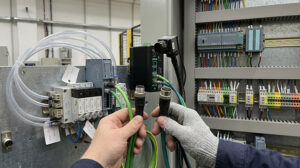
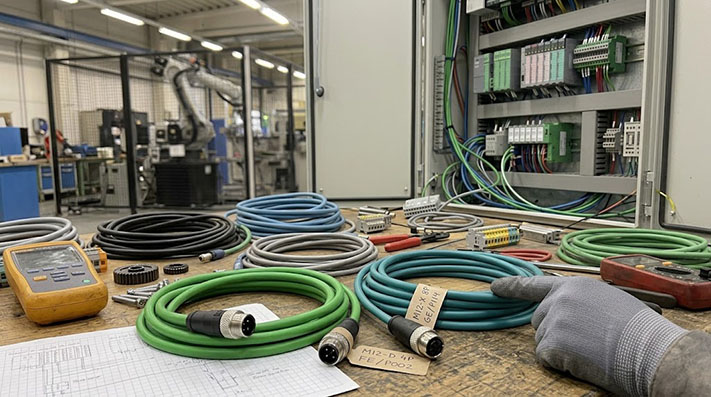
When connecting a new piece of automation equipment to your factory network, the physical cable is often the last component considered—and one of the most critical[cite: 8]. Choosing the wrong M12 Ethernet cable can lead to intermittent data loss, network slowdowns, and difficult-to-diagnose communication faults between PLCs, robots, and vision systems[cite: 8].
The decision often comes down to two common standards: the 4-pin M12 D-Code and the 8-pin M12 X-Code[cite: 8]. While they may look similar, their performance capabilities are fundamentally different[cite: 8]. Selecting the correct one is essential for network stability and future performance[cite: 8].
TL;DR: D-Code for 100 Mbps, X-Code for Gigabit Speeds
The short answer: M12 D-Code (4-pin) is the established standard for 100 Mbps Fast Ethernet[cite: 8]. It is widely used for many Industrial Ethernet protocols like EtherNet/IP and Profinet[cite: 8]. M12 X-Code (8-pin) is specifically designed for high-speed Gigabit Ethernet (1 Gbps and up to 10 Gbps)[cite: 8]. It is the necessary choice for high-bandwidth applications like machine vision and for future-proofing your network infrastructure[cite: 8].
M12 D-Code vs. X-Code: A Technical Comparison
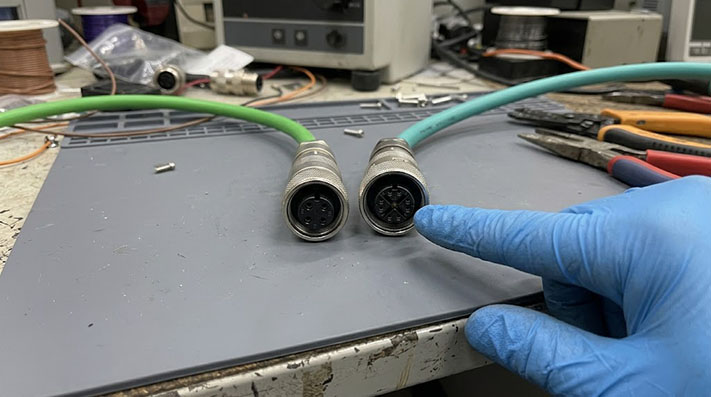
Understanding the design differences helps clarify which cable assembly is right for your machine[cite: 8]. The primary distinction lies in the pin count, data rate, and internal shielding design[cite: 8].
| Feature | M12 D-Code (4-Pin) | M12 X-Code (8-Pin) |
|---|---|---|
| Data Rate | Up to 100 Mbps (Fast Ethernet)[cite: 8] | Up to 10 Gbps (Gigabit Ethernet)[cite: 8] |
| Pin Count & Layout | 4 pins, single pair shielded[cite: 8] | 8 pins, four individually shielded pairs[cite: 8] |
| Internal Shielding | Uses two twisted pairs for data transmission[cite: 8]. | Features a cross-shaped shield (the "X") that isolates each of the four twisted pairs, preventing crosstalk at high frequencies[cite: 8]. |
| Primary Use Case | Standard sensors, actuators, and fieldbus connections for protocols like EtherNet/IP and Profinet[cite: 8]. | High-speed data links for vision systems, robotic controllers, inter-machine communication, and network backbones[cite: 8]. |
High-Frequency Signal Integrity & Electrical Parameter Matrix: D-Code vs. X-Code
To ensure error-free Industrial Ethernet transmission without packet drops under heavy EMI, physical layer high-frequency limits must be verified:
| Electrical & Transmission Metric | M12 D-Code Industrial Assembly (Fast Ethernet) | M12 X-Code Industrial Assembly (Gigabit / 10G) | Engineering Standard & Testing Method |
|---|---|---|---|
| Max Transmission Bandwidth | 100 MHz (Cat5e Performance Level) | Up to 500 MHz (Cat6A Performance Level) | ISO/IEC 11801 Class D vs. Class EA |
| Differential Characteristic Impedance | 100 ohms ± 15% (at 100 MHz) | 100 ohms ± 5% (Precision Toleranced) | TIA-568-C.2 Component Specification |
| Near-End Crosstalk (NEXT) at 100MHz | Greater than or equal to 30.1 dB isolation | Greater than or equal to 44.3 dB isolation | IEC 60603-7 Modular Plug Specification |
| Return Loss (RL) Performance | Min 10.0 dB (Adequate for 100 Mbps) | Min 17.3 dB (Minimal signal reflection) | IEC 60603-7-41 / -51 |
 [cite: 8]
How Industrial Protocols Influence Your Cable Choice
Industrial Protocol Bandwidth Demands & Connector Code Selection Matrix
Matching the network protocol's actual physical layer requirements to the correct M12 connector architecture prevents system mismatch:
| Industrial Protocol Standard | Typical Operating Data Rate | Physical Layer Standard | Recommended M12 Connector Code | Primary Target Automation Application |
|---|---|---|---|---|
| Profinet (Conformance Class B/C) | 100 Mbps (Fast Ethernet) | 100BASE-TX | M12 D-Code (4-Pin) | PLCs, distributed I/O blocks, standard drives |
| EtherNet/IP (CIP Networks) | 100 Mbps / 1 Gbps Scalable | 100BASE-TX / 1000BASE-T | D-Code (Standard) or X-Code (High-Load) | Factory automation backbones, high-node cells |
| EtherCAT (Real-Time Industrial) | 100 Mbps (Standard Fast Ethernet) | 100BASE-TX (Full Duplex) | M12 D-Code (4-Pin) | High-speed synchronized motion control axes |
| GigE Vision (Machine Vision) | 1 Gbps to 10 Gbps High-Bandwidth | 1000BASE-T / 10GBASE-T | M12 X-Code (8-Pin) | High-resolution industrial cameras & smart sensors |
Your Industrial Ethernet protocol—such as EtherNet/IP, Profinet, or EtherCAT—does not, by itself, demand a specific connector code[cite: 8]. Instead, the protocol's data rate requirement for your specific application dictates the necessary hardware[cite: 8].
- EtherNet/IP and Profinet: Many devices running these protocols operate perfectly at 100 Mbps[cite: 8]. In these cases, a standard M12 D-Code cable assembly is a reliable and cost-effective solution[cite: 8]. It is the workhorse for connecting PLCs, remote I/O blocks, and standard sensors[cite: 8].
- EtherCAT: While EtherCAT is known for its high speed, its 100 Mbps "Fast Ethernet" physical layer means M12 D-Code connectors are commonly used between nodes[cite: 8]. However, for gateways or segments requiring higher bandwidth, X-Code may be specified[cite: 8].
- GigE Vision: This high-performance machine vision protocol requires Gigabit Ethernet speeds to handle large image data streams without latency[cite: 8]. For any GigE Vision camera, an M12 X-Code assembly is non-negotiable[cite: 8].
The key is to check the data port specifications on your equipment[cite: 8]. If the port is rated for 10/100 Mbps, D-Code is sufficient[cite: 8]. If it is rated for 10/100/1000 Mbps (Gigabit), you must use an X-Code cable to achieve that performance[cite: 8]. Using a D-Code cable on a Gigabit port will force the connection to downgrade to 100 Mbps[cite: 8].
Matching the Connector to the Machine: Common Applications
- Robotic Arms and Motion Control: For standard motion commands and I/O signals, D-Code is often adequate[cite: 8]. However, if the robot controller is processing complex vision data or is part of a high-speed synchronized network, X-Code provides the necessary bandwidth and signal integrity[cite: 8].
- Machine Vision Systems: Any system using high-resolution cameras for inspection, guidance, or quality control requires the high data throughput of Gigabit Ethernet[cite: 8]. M12 X-Code is the standard here[cite: 8].
- PLC and I/O Networks: For connecting a central PLC to distributed I/O blocks, sensors, and actuators, D-Code is typically sufficient[cite: 8]. The exception is for the main network backbone connecting switches or different production cells, where X-Code provides a robust, high-capacity link[cite: 8].
 [cite: 8]
Reading Cable Specs: What to Verify Before You Buy
Marketing terms can be confusing[cite: 8]. A cable might be described as "for Ethernet" without clarifying its performance limits[cite: 8]. To avoid errors, focus on verifiable specifications[cite: 8].
- Check the Coding, Not Just the Marketing: The most important specification is the connector coding[cite: 8]. If you need 1 Gbps, the part description must state "X-Code[cite: 8]." A 4-pin D-Code cable cannot physically support Gigabit speeds, regardless of marketing claims[cite: 8].
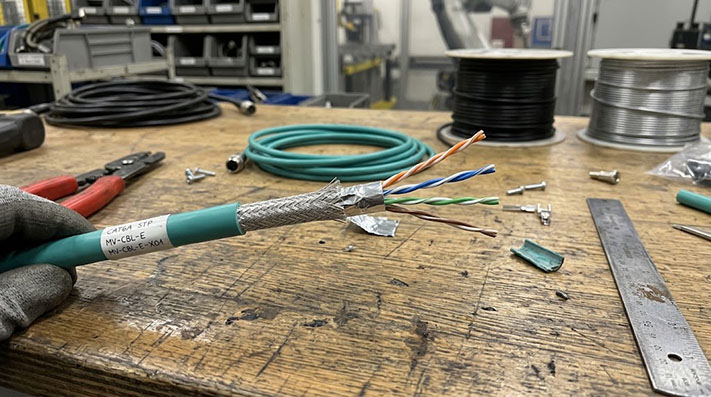
- Verify Shielding Construction: For reliable communication in electrically noisy factory environments (near motors, drives, and welders), robust shielding is essential[cite: 8]. Look for specifications that mention foil and braid shields (e.g., S/FTP - Screened/Foiled Twisted Pair)[cite: 8]. The internal cross-shielding of X-Code provides superior protection against crosstalk, which is a major cause of errors at gigabit speeds[cite: 8].
- Match the Jacket to the Environment: The cable jacket protects the internal conductors[cite: 8]. A standard PVC jacket is fine for clean, static applications[cite: 8]. For robotic arms, moving gantries, or areas with cutting oils, you must specify a cable with a jacket material like PUR (polyurethane) that is designed for high-flex, drag-chain use, and chemical resistance[cite: 8].
Mechanical Flex Life, Shielding Topology & Cable Jacket Selection for Automation
Deploying high-speed Ethernet cables across moving machine axes requires strict adherence to mechanical endurance limits:
| Industrial Motion Profile / Application | Recommended Jacket Material | Shielding Topology Requirement | Min. Dynamic Bend Radius | Tested Drag Chain Flex Cycles |
|---|---|---|---|---|
| Static / Fixed Cabinet Routing | PVC (Cost-Optimized) | UTP or Foil-Only (F/UTP) | 5 x Outer Diameter (OD) | N/A (Fixed Installation) |
| Standard Cable Tray / Catenary Run | PVC / PUR Hybrid | SF/UTP (Overall Foil + Braid) | 7.5 x OD | Greater than 1,000,000 Cycles |
| High-Flex Drag Chain (Robotic Axis) | PUR (Polyurethane) | S/FTP (Individual Pair Foil + Heavy Braid) | 10 x OD | Greater than 5,000,000 to 10,000,000 Cycles |
| 3D Articulated Torsion Arm (Robot) | TPE (Thermoplastic Elastomer) | High-Density Tinned Copper Braid | 12 x OD | Greater than 3,000,000 (plus/minus 360 deg/m) |
Configuring Your M12 Ethernet Cable Assembly
Choosing the right cable assembly goes beyond just D-Code or X-Code[cite: 8]. To ensure you get a plug-and-play solution, it is important to define your complete requirements[cite: 8]. A reliable supplier can configure an assembly based on your exact needs, preventing costly rework and downtime[cite: 8].
When preparing an RFQ, providing clear details is the fastest way to a correct and reliable quote[cite: 8]. Be ready to share[cite: 8]:
- Connector A and Connector B: Specify the code (D-Code, X-Code), gender (male, female), and orientation (straight, right-angle) for both ends of the cable[cite: 8]. One end might be an M12 and the other an RJ45[cite: 8].
- Cable Length: Precise length minimizes excess cable and signal degradation[cite: 8].
- Application & Protocol: Mention the machine (e.g., CNC machine, robotic cell) and the protocol (e.g., EtherNet/IP, GigE Vision)[cite: 8]. This context helps a supplier recommend the correct cable construction[cite: 8].
- Environment: Note any requirements for high-flex, torsion, oil resistance, or washdown environments[cite: 8]. This determines the appropriate cable jacket and overall build quality[cite: 8].
Provide us with your equipment details, network protocol, and operating environment[cite: 8]. The ConnecLink team can help confirm the ideal M12 cable assembly to ensure your automation systems communicate clearly and reliably[cite: 8].
<!--[googlesitekit-end-of-content]-->